
Flutter BLoC + Clean Architecture: A Practical Guide with Patterns and Code
A practical, end-to-end guide to combining Flutter’s BLoC pattern with Clean Architecture using code, structure, DI, and testing tips.
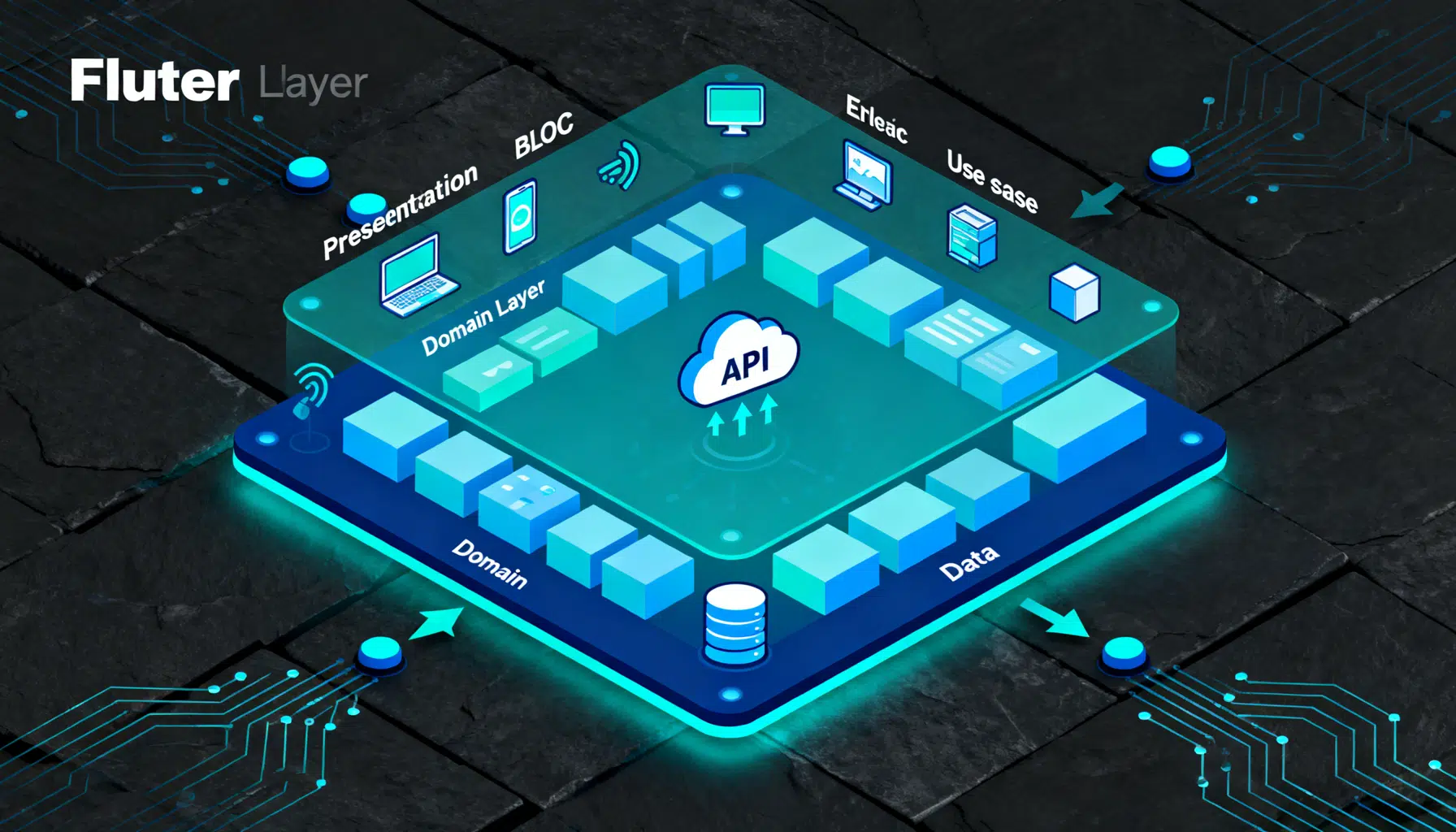
Image used for representation purposes only.
Why BLoC and Clean Architecture Belong Together
Flutter’s BLoC (Business Logic Component) pattern shines when your app grows beyond a couple of screens. Clean Architecture, popularized by Robert C. Martin, helps you keep that growth sustainable by enforcing boundaries and dependency direction. Together, they give you:
- Clear separation of concerns
- Testable, business-first code
- Replaceable frameworks (HTTP clients, databases, UI)
- Stable domain models that survive UI or API changes
This article shows a pragmatic, end‑to‑end setup that combines Flutter, flutter_bloc, and Clean Architecture for a feature called “Weather Search.” You’ll see structure, essential classes, wiring, and testing tips you can adapt to any feature.
The Architectural Layers at a Glance
Clean Architecture enforces the Dependency Rule: source code dependencies point inward, toward the domain. From outermost to innermost:
- Presentation (Flutter widgets + BLoC): UI, input handling, state rendering
- Domain (Entities, Value Objects, Use Cases, Repository interfaces): business rules
- Data (Repository implementations, Data Sources, Models, Mappers): IO details, frameworks
A typical folder tree per app module (feature-first organization) looks like this:
lib/
  core/
    error/
    network/
    util/
  features/
    weather/
      presentation/
        bloc/
          weather_bloc.dart
          weather_event.dart
          weather_state.dart
        pages/
          weather_page.dart
      domain/
        entities/
          weather.dart
        repositories/
          weather_repository.dart
        usecases/
          get_weather_by_city.dart
      data/
        datasources/
          weather_remote_data_source.dart
        models/
          weather_model.dart
        repositories/
          weather_repository_impl.dart
  di/
    injection.dart
The Data Flow
- User enters a city and taps “Search.”
- BLoC receives an event and invokes a domain Use Case.
- The Use Case calls the Repository interface.
- A Repository implementation in the data layer consults a Remote Data Source (and/or Local cache).
- Raw DTO/JSON is mapped into a Domain Entity.
- Results flow back to BLoC, which emits UI states.
Domain Layer: Business at the Center
Entities express business meaning—free from HTTP, JSON, or Flutter. Use Cases encapsulate specific actions.
Entity example:
// features/weather/domain/entities/weather.dart
class Weather {
  final String city;
  final double temperatureC;
  final String condition; // e.g., 'Cloudy'

  const Weather({
    required this.city,
    required this.temperatureC,
    required this.condition,
  });
}
Repository contract:
// features/weather/domain/repositories/weather_repository.dart
sealed class Failure {
  final String message;
  const Failure(this.message);
}
class NetworkFailure extends Failure { const NetworkFailure(String m) : super(m); }
class ServerFailure extends Failure { const ServerFailure(String m) : super(m); }

sealed class Result<T> {
  const Result();
}
class Ok<T> extends Result<T> { final T value; const Ok(this.value); }
class Err<T> extends Result<T> { final Failure failure; const Err(this.failure); }

abstract interface class WeatherRepository {
  Future<Result<Weather>> getByCity(String city);
}
Use Case:
// features/weather/domain/usecases/get_weather_by_city.dart
import '../entities/weather.dart';
import '../repositories/weather_repository.dart';

class GetWeatherByCity {
  final WeatherRepository repo;
  const GetWeatherByCity(this.repo);

  Future<Result<Weather>> call(String city) {
    if (city.trim().isEmpty) {
      return Future.value(Err(ServerFailure('City cannot be empty')));
    }
    return repo.getByCity(city.trim());
  }
}
Data Layer: Talking to the Outside World
The data layer adapts external formats to domain entities.
Model and mapper:
// features/weather/data/models/weather_model.dart
import '../../domain/entities/weather.dart';

class WeatherModel {
  final String name;
  final double tempC;
  final String description;

  const WeatherModel({required this.name, required this.tempC, required this.description});

  factory WeatherModel.fromJson(Map<String, dynamic> json) {
    return WeatherModel(
      name: json['name'] as String,
      tempC: (json['main']['temp'] as num).toDouble(),
      description: (json['weather'][0]['main'] as String),
    );
  }

  Weather toEntity() => Weather(city: name, temperatureC: tempC, condition: description);
}
Remote data source (abstracted HTTP):
// features/weather/data/datasources/weather_remote_data_source.dart
abstract interface class HttpClient {
  Future<(int status, Map<String, dynamic> json)> get(String url, {Map<String, String>? headers});
}

abstract interface class WeatherRemoteDataSource {
  Future<WeatherModel> fetchByCity(String city);
}

class WeatherRemoteDataSourceImpl implements WeatherRemoteDataSource {
  final HttpClient client;
  final String baseUrl; // e.g., 'https://api.example.com/weather'

  WeatherRemoteDataSourceImpl({required this.client, required this.baseUrl});

  @override
  Future<WeatherModel> fetchByCity(String city) async {
    final (status, body) = await client.get('$baseUrl?city=$city');
    if (status == 200) {
      return WeatherModel.fromJson(body);
    }
    throw Exception('Server error: $status');
  }
}
Repository implementation:
// features/weather/data/repositories/weather_repository_impl.dart
import '../../domain/entities/weather.dart';
import '../../domain/repositories/weather_repository.dart';
import '../datasources/weather_remote_data_source.dart';

class WeatherRepositoryImpl implements WeatherRepository {
  final WeatherRemoteDataSource remote;
  const WeatherRepositoryImpl(this.remote);

  @override
  Future<Result<Weather>> getByCity(String city) async {
    try {
      final model = await remote.fetchByCity(city);
      return Ok(model.toEntity());
    } on Exception catch (e) {
      final msg = e.toString();
      // Map low-level errors to Failures consistently
      if (msg.contains('Server error')) return Err(ServerFailure('Server unavailable'));
      return Err(NetworkFailure('Check your connection'));
    }
  }
}
Presentation Layer: BLoC Drives UI
Events describe user intent; states describe what the UI should render.
Events and states:
// features/weather/presentation/bloc/weather_event.dart
sealed class WeatherEvent { const WeatherEvent(); }
class CitySubmitted extends WeatherEvent { final String city; const CitySubmitted(this.city); }
class RefreshRequested extends WeatherEvent { const RefreshRequested(); }

// features/weather/presentation/bloc/weather_state.dart
import '../../../domain/entities/weather.dart';

sealed class WeatherState { const WeatherState(); }
class WeatherIdle extends WeatherState { const WeatherIdle(); }
class WeatherLoading extends WeatherState { const WeatherLoading(); }
class WeatherLoaded extends WeatherState { final Weather data; const WeatherLoaded(this.data); }
class WeatherFailure extends WeatherState { final String message; const WeatherFailure(this.message); }
The BLoC itself:
// features/weather/presentation/bloc/weather_bloc.dart
import 'package:flutter_bloc/flutter_bloc.dart';
import '../../../domain/usecases/get_weather_by_city.dart';
import 'weather_event.dart';
import 'weather_state.dart';

class WeatherBloc extends Bloc<WeatherEvent, WeatherState> {
  final GetWeatherByCity getWeather;
  String _lastCity = '';

  WeatherBloc(this.getWeather) : super(const WeatherIdle()) {
    on<CitySubmitted>(_onCitySubmitted);
    on<RefreshRequested>(_onRefreshRequested);
  }

  Future<void> _onCitySubmitted(CitySubmitted e, Emitter<WeatherState> emit) async {
    _lastCity = e.city;
    emit(const WeatherLoading());
    final result = await getWeather(e.city);
    switch (result) {
      case Ok(value: final weather):
        emit(WeatherLoaded(weather));
      case Err(failure: final f):
        emit(WeatherFailure(f.message));
    }
  }

  Future<void> _onRefreshRequested(RefreshRequested e, Emitter<WeatherState> emit) async {
    if (_lastCity.isEmpty) return;
    add(CitySubmitted(_lastCity));
  }
}
A minimal UI page:
// features/weather/presentation/pages/weather_page.dart
import 'package:flutter/material.dart';
import 'package:flutter_bloc/flutter_bloc.dart';
import '../bloc/weather_bloc.dart';
import '../bloc/weather_event.dart';
import '../bloc/weather_state.dart';

class WeatherPage extends StatefulWidget {
  const WeatherPage({super.key});
  @override State<WeatherPage> createState() => _WeatherPageState();
}

class _WeatherPageState extends State<WeatherPage> {
  final _controller = TextEditingController();

  @override
  Widget build(BuildContext context) {
    return Scaffold(
      appBar: AppBar(title: const Text('Weather Search')),
      body: Padding(
        padding: const EdgeInsets.all(16),
        child: Column(
          children: [
            Row(children: [
              Expanded(
                child: TextField(
                  controller: _controller,
                  decoration: const InputDecoration(labelText: 'City'),
                  onSubmitted: (v) => context.read<WeatherBloc>().add(CitySubmitted(v)),
                ),
              ),
              const SizedBox(width: 8),
              ElevatedButton(
                onPressed: () => context.read<WeatherBloc>().add(CitySubmitted(_controller.text)),
                child: const Text('Search'),
              ),
            ]),
            const SizedBox(height: 16),
            Expanded(
              child: BlocBuilder<WeatherBloc, WeatherState>(
                builder: (context, state) {
                  return switch (state) {
                    WeatherIdle() => const Center(child: Text('Enter a city to begin.')),
                    WeatherLoading() => const Center(child: CircularProgressIndicator()),
                    WeatherLoaded(:final data) => Center(
                      child: Text('${data.city}: ${data.temperatureC.toStringAsFixed(1)}°C, ${data.condition}'),
                    ),
                    WeatherFailure(:final message) => Center(child: Text(message, style: const TextStyle(color: Colors.red))),
                  };
                },
              ),
            ),
          ],
        ),
      ),
    );
  }
}
Dependency Injection: Wiring the Layers
Use a simple service locator for clarity; scale up with injectable if needed.
// di/injection.dart
import 'package:get_it/get_it.dart';
import '../features/weather/data/datasources/weather_remote_data_source.dart';
import '../features/weather/data/repositories/weather_repository_impl.dart';
import '../features/weather/domain/repositories/weather_repository.dart';
import '../features/weather/domain/usecases/get_weather_by_city.dart';
import '../features/weather/presentation/bloc/weather_bloc.dart';

final sl = GetIt.instance;

class SimpleHttpClient implements HttpClient {
  @override
  Future<(int, Map<String, dynamic>)> get(String url, {Map<String, String>? headers}) async {
    // Stub: replace with real client (e.g., http or dio)
    await Future.delayed(const Duration(milliseconds: 400));
    return (200, {
      'name': 'London',
      'main': {'temp': 18.2},
      'weather': [ {'main': 'Cloudy'} ]
    });
  }
}

Future<void> initDI() async {
  // Core
  sl.registerLazySingleton<HttpClient>(() => SimpleHttpClient());

  // Data
  sl.registerLazySingleton<WeatherRemoteDataSource>(() =>
    WeatherRemoteDataSourceImpl(client: sl(), baseUrl: 'https://api.example.com/weather'));
  sl.registerLazySingleton<WeatherRepository>(() => WeatherRepositoryImpl(sl()));

  // Domain
  sl.registerFactory(() => GetWeatherByCity(sl()));

  // Presentation
  sl.registerFactory(() => WeatherBloc(sl()));
}
In main.dart:
// main.dart (excerpt)
import 'package:flutter/material.dart';
import 'package:flutter_bloc/flutter_bloc.dart';
import 'di/injection.dart';
import 'features/weather/presentation/bloc/weather_bloc.dart';
import 'features/weather/presentation/pages/weather_page.dart';

void main() async {
  WidgetsFlutterBinding.ensureInitialized();
  await initDI();
  runApp(const App());
}

class App extends StatelessWidget {
  const App({super.key});
  @override
  Widget build(BuildContext context) {
    return MaterialApp(
      home: BlocProvider(
        create: (_) => sl<WeatherBloc>(),
        child: const WeatherPage(),
      ),
    );
  }
}
Testing Strategy
The boundaries make testing straightforward.
- Domain: pure unit tests for Use Cases and Value Objects
- Data: mock/stub HTTP and ensure mapping and error translation
- Presentation: use bloc_test to validate event-to-state transitions
Example bloc test (pseudo-style):
// weather_bloc_test.dart (sketch)
import 'package:bloc_test/bloc_test.dart';
import 'package:flutter_test/flutter_test.dart';
import 'package:mocktail/mocktail.dart';

class MockUseCase extends Mock implements GetWeatherByCity {}

void main() {
  late MockUseCase mock;

  setUp(() { mock = MockUseCase(); });

  blocTest<WeatherBloc, WeatherState>(
    'emits [Loading, Loaded] when search succeeds',
    build: () {
      when(() => mock.call('Paris'))
          .thenAnswer((_) async => Ok(Weather(city: 'Paris', temperatureC: 21.0, condition: 'Clear')));
      return WeatherBloc(mock);
    },
    act: (bloc) => bloc.add(const CitySubmitted('Paris')),
    expect: () => [isA<WeatherLoading>(), isA<WeatherLoaded>()],
  );
}
Practical Tips and Conventions
- Keep business logic out of widgets; let widgets react to BLoC state only.
- Use feature-first folders to keep related code co-located.
- Treat Use Cases as the only entry to the domain from UI; keep them simple and focused.
- Model domain failures deliberately; map low-level exceptions to meaningful Failure types.
- Use BlocSelector to reduce rebuilds for large states.
- Debounce rapid events (search text) with EventTransformers.
- Prefer immutable classes; adopt code generation (freezed, json_serializable) to cut boilerplate.
- Start small: apply the structure to one feature, then replicate.
Common Anti-patterns to Avoid
- Fat BLoCs doing networking or JSON parsing (push that to data sources).
- UI depending on data models/DTOs (always map to entities first).
- Leaking frameworks inward (no flutter/material imports in domain or data models that represent domain).
- Catch-all Exception handling with no translation to Failure; your UI needs semantic errors.
- Massive God Repositories; split by aggregate roots or bounded contexts.
Evolving the Stack
- Caching: add a LocalDataSource and wrap Repository with cache-first strategies.
- Multiple APIs: compose repositories or add mappers per provider.
- Offline-first: propagate value objects that can represent stale vs. fresh data.
- Theming/Accessibility: remains in presentation; domain stays unchanged.
- Modularity: extract features into packages as the app grows.
Conclusion
BLoC gives Flutter a disciplined state management approach; Clean Architecture ensures that discipline scales. By centering your domain and strictly controlling dependencies, you get code that’s easier to change, test, and reason about. Start with one feature, enforce boundaries, write tests at each layer, and let the architecture work for you as the app—and your team—grows.
Related Posts
Flutter State Management Guide: Patterns, Packages, and Practical Examples
A practical, end-to-end Flutter state management guide with patterns, packages, examples, and performance tips for building scalable, testable apps.
Flutter GetX Tutorial: State, Routing, and Dependency Injection in One Lightweight Package
Step-by-step Flutter GetX tutorial covering state, routing, DI, bindings, workers, theming, and i18n with practical code snippets.

Flutter REST API Integration: A Practical, Production-Ready Guide
End-to-end Flutter REST API integration: http vs Dio, auth, error handling, caching, pagination, testing, security, and best practices.