
LangGraph Multi‑Agent Workflow Tutorial: From Supervisor Routing to Tool Execution
Build a production-ready LangGraph multi-agent workflow with a supervisor, tools, checkpointing, and streaming—step-by-step with tested Python code.
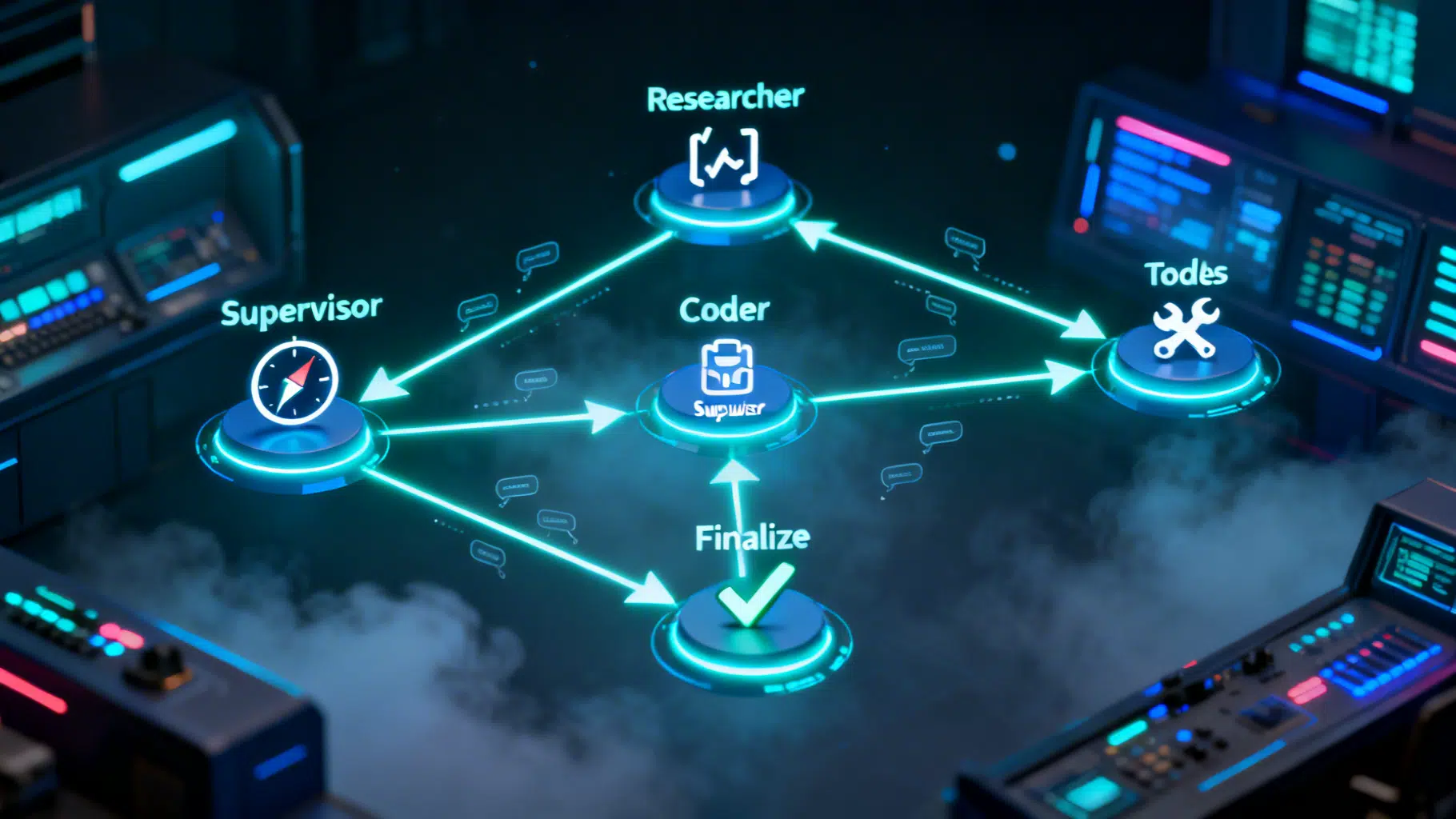
Image used for representation purposes only.
Overview
Multi‑agent systems help you decompose complex tasks into specialized roles that collaborate. LangGraph gives you a light, Pythonic way to build these agent teams as stateful graphs with explicit control flow, tool use, and checkpointing. In this tutorial you’ll build a minimal—yet production‑ready—multi‑agent workflow featuring:
- A supervisor that routes work
- Two specialized agents (Researcher and Coder)
- A shared tool node for function‑calling tools
- Deterministic routing logic you can test
- Checkpointing for reliability and resumability
- Streaming for responsive UIs
By the end, you’ll understand the architectural patterns and code you can adapt to real projects.
Prerequisites
- Python 3.10+
- Basic familiarity with LangChain‑style chat models and tools
Install dependencies:
pip install langgraph langchain langchain-openai
Set your model provider key (example uses OpenAI; adapt as needed):
export OPENAI_API_KEY=your_key_here
Architecture at a Glance
We’ll model the workflow as a directed graph with state. Messages flow through nodes, and conditional edges decide the next step.
- START → Supervisor → {Researcher | Coder | Finalize}
- Researcher/Coder → (if tool call) Tools → Supervisor
- Finalize → END
Key ideas:
- State is a TypedDict that accumulates messages.
- Each node is a pure function: state in, partial state out.
- Conditional edges keep control explicit and testable.
- A Tool node centralizes function calls triggered by the model.
Step 1 — Define the shared state
We store chat history in a messages field that supports incremental appends.
from typing import Annotated, TypedDict
from langgraph.graph.message import add_messages

class TeamState(TypedDict):
    # add_messages merges list updates so nodes can append safely
    messages: Annotated[list, add_messages]
Why this shape? It’s minimal, easy to serialize, and works with tool‑calling models that emit messages and tool invocations.
Step 2 — Stand up your model
We’ll use LangChain’s ChatOpenAI wrapper. Replace with your provider as needed.
from langchain_openai import ChatOpenAI

# Deterministic behavior is valuable for testing
llm = ChatOpenAI(model="gpt-4o-mini", temperature=0)
Step 3 — Define tools (function calling)
Use simple, safe stubs for tutorial purposes. In production, wire these to your actual systems.
from langchain_core.tools import tool

@tool
def web_search(query: str) -> str:
    """Return a brief, synthetic summary for a web query. Replace with real search."""
    return f"(stub) Top findings for '{query}': source A … source B …"

@tool
def run_python(code: str) -> str:
    """Execute a tiny, sandboxed Python snippet. Use a real sandbox in production."""
    try:
        # Extremely restricted globals; adjust carefully or replace with a proper sandbox
        allowed_builtins = {"print": print, "range": range, "len": len, "sum": sum}
        local_vars = {}
        exec(code, {"__builtins__": allowed_builtins}, local_vars)
        return str(local_vars) or "ok"
    except Exception as e:
        return f"error: {e}"

TOOLS = [web_search, run_python]
Step 4 — Build specialized agents
Each agent binds the same tools but is prompted differently for role clarity.
from langchain_core.messages import SystemMessage

researcher_system = SystemMessage(
    content=(
        "You are a Researcher. Triage the user task, break it into steps, "
        "and call web_search when external information is needed. Cite sources succinctly."
    )
)

coder_system = SystemMessage(
    content=(
        "You are a Coder. Produce clear, correct code and minimal commentary. "
        "Use run_python to validate small snippets or calculations."
    )
)

def researcher_node(state: TeamState):
    bound = llm.bind_tools(TOOLS)
    msgs = [researcher_system, *state["messages"]]
    ai_msg = bound.invoke(msgs)
    return {"messages": [ai_msg]}

def coder_node(state: TeamState):
    bound = llm.bind_tools(TOOLS)
    msgs = [coder_system, *state["messages"]]
    ai_msg = bound.invoke(msgs)
    return {"messages": [ai_msg]}
Step 5 — Create a supervisor (router)
We’ll start with a rule‑based router for determinism. You can replace it with an LLM router later.
def supervisor_router(state: TeamState) -> str:
    """Return the next node: 'researcher', 'coder', or 'finalize'."""
    if not state["messages"]:
        return "researcher"
    last = state["messages"][-1]
    text = (getattr(last, "content", "") or "").lower()

    # Simple, transparent rules
    if any(k in text for k in ["final", "summary", "ready to deliver"]):
        return "finalize"
    if any(k in text for k in ["code", "script", "function", "implement", "bug"]):
        return "coder"
    if any(k in text for k in ["search", "find", "web", "learn", "current", "source"]):
        return "researcher"
    # Default exploration path
    return "researcher"
And a finalize node that composes the final answer.
def finalize_node(state: TeamState):
    prompt = [
        SystemMessage(
            content=(
                "You are the Team Lead. Merge the discussion into a crisp final answer. "
                "If code was produced, include the final, verified version."
            )
        ),
        *state["messages"],
    ]
    ai_msg = llm.invoke(prompt)
    return {"messages": [ai_msg]}
Step 6 — Wire the graph
Use LangGraph’s StateGraph to define nodes and edges. The prebuilt ToolNode executes any tool calls emitted by agents.
from langgraph.graph import StateGraph, START, END
from langgraph.prebuilt import ToolNode, tools_condition
from langgraph.checkpoint.memory import MemorySaver

# Define the graph
graph = StateGraph(TeamState)

# Nodes
graph.add_node("supervisor", supervisor_router)      # conditional router (returns next node name)
graph.add_node("researcher", researcher_node)
graph.add_node("coder", coder_node)
graph.add_node("tools", ToolNode(TOOLS))
graph.add_node("finalize", finalize_node)

# Entry
graph.add_edge(START, "supervisor")

# Supervisor routes to one of the specialists or finalizer
graph.add_conditional_edges(
    "supervisor",
    supervisor_router,
    {"researcher": "researcher", "coder": "coder", "finalize": "finalize"},
)

# After a specialist responds, either execute tools (if any) or return to supervisor
graph.add_conditional_edges(
    "researcher",
    tools_condition,
    {"tools": "tools", "__else__": "supervisor"},
)

graph.add_conditional_edges(
    "coder",
    tools_condition,
    {"tools": "tools", "__else__": "supervisor"},
)

# Tools hand control back to the supervisor
graph.add_edge("tools", "supervisor")

# Finalizer ends the run
graph.add_edge("finalize", END)

# Compile with an in-memory checkpointer for idempotency and resumability
app = graph.compile(checkpointer=MemorySaver())
Why a checkpointer? It enables safe retries and lets you resume a run by thread_id, crucial for UIs and background workers.
Step 7 — Run a single turn
from langchain_core.messages import HumanMessage

config = {"configurable": {"thread_id": "demo-thread-001"}}

result = app.invoke(
    {"messages": [HumanMessage(content="Research modern caching strategies for Python APIs and propose a plan.")]},
    config=config,
)

# The final state contains all accumulated messages
for msg in result["messages"][-4:]:
    role = getattr(msg, "type", "assistant")
    print(role, "::", getattr(msg, "content", msg))
You should see a Researcher‑style response; if it triggered a tool call, the tool output will appear before control returns to the supervisor.
Step 8 — Stream events (great for UIs)
Streaming yields each node’s partial results as they happen.
for event in app.stream(
    {"messages": [HumanMessage(content="Write a function to diff two lists and test it.")]},
    config={"configurable": {"thread_id": "demo-thread-002"}},
):
    for node, payload in event.items():
        if node == "supervisor":
            print("→ route:", payload)
        elif node in {"researcher", "coder", "finalize"}:
            last = payload["messages"][-1]
            print(f"[{node}]", getattr(last, "content", last))
This structure maps cleanly to server‑sent events or websockets in a front end.
Step 9 — Persist across sessions (SQLite)
Memory is fine for demos, but you’ll want durable checkpoints in real apps.
from langgraph.checkpoint.sqlite import SqliteSaver

app = graph.compile(checkpointer=SqliteSaver("langgraph_demo.sqlite"))

# Later, resume the same conversation
config = {"configurable": {"thread_id": "customer-42"}}
app.invoke({"messages": [HumanMessage(content="Continue where we left off.")]}, config=config)
Step 10 — Swap in an LLM supervisor (optional)
Replace the rule‑based router with an LLM that emits the next node label. Keep the conditional edges identical.
from langchain_core.pydantic_v1 import BaseModel, Field

class RouteDecision(BaseModel):
    next: str = Field(description="One of: researcher, coder, finalize")

def llm_supervisor(state: TeamState) -> str:
    schema_llm = llm.with_structured_output(RouteDecision)
    guidance = (
        "Decide the next specialist. If the user asks for code or debugging → coder. "
        "If the user needs information → researcher. If results look complete → finalize."
    )
    decision = schema_llm.invoke([
        SystemMessage(content=guidance),
        *state["messages"],
    ])
    return decision.next
Swap the router in your graph with llm_supervisor—no other changes required.
Production tips
- Determinism first: start with rule‑based routing, then introduce an LLM router if needed.
- Keep nodes pure and idempotent. Let the checkpointer handle reliability.
- Centralize tools in a Tool node; it keeps graphs simple and auditable.
- Validate tool arguments with Pydantic types on your @tool functions.
- Add a budget/turn limit by counting messages in state and short‑circuiting to finalize.
- Observe everything: enable tracing (e.g., LangSmith) to inspect node IO and latencies.
Testing the router
Because supervisor_router is a plain function, you can unit‑test it without the model:
def test_router_defaults_to_researcher():
    assert supervisor_router({"messages": []}) == "researcher"

def test_router_sends_code_requests_to_coder():
    class Msg: content = "Please implement a quicksort function"
    assert supervisor_router({"messages": [Msg()]}) == "coder"
Extending the pattern
- Add more specialists: Reviewer, DataAnalyst, or Planner.
- Introduce parallel branches by splitting the graph and merging at Finalize.
- Gate human‑in‑the‑loop steps by adding a Review node that requires operator approval before resuming.
- Replace stubs with production tools: real web search, vector stores, code runners, ticketing systems.
Troubleshooting
- Tools not firing? Ensure your agent is
bind_tools(TOOLS)and your edges usetools_conditionto route to the Tool node. - Loops forever? Add a hop counter in state; route to Finalize after N cycles.
- Messages missing? Confirm your state uses
add_messagesso appends don’t overwrite. - Inconsistent behavior? Set
temperature=0in early development.
Wrap‑up
You built a robust multi‑agent workflow with explicit control flow, shared tools, checkpointing, and streaming—exactly the primitives you need to scale from a prototype to production. LangGraph keeps orchestration simple and inspectable while letting you evolve routing logic and tools as your use case grows.
Related Posts
LangChain API Tutorial: From Hello World to Production RAG with FastAPI and LangServe
Build a production-ready LangChain API: LCEL chains, LangServe, FastAPI streaming, RAG, structured outputs, testing, and deployment tips.

DeepSeek API Integration Tutorial: From First Call to Production
Step-by-step DeepSeek API integration: base URL, models, cURL/Python/Node code, streaming, thinking mode, tool calls, errors, and production tips.
GPT‑4 API Structured Outputs: A Hands‑On Tutorial for Reliable JSON
A practical GPT‑4 API guide to Structured Outputs: enforce JSON Schemas via Responses and Chat Completions, with code, streaming, and production tips.