
A Practical Guide to Multi‑Modal RAG: Images Plus Text, End‑to‑End Tutorial
Build a practical multi‑modal RAG system that retrieves from images and text using OCR, captions, CLIP embeddings, and vector search.
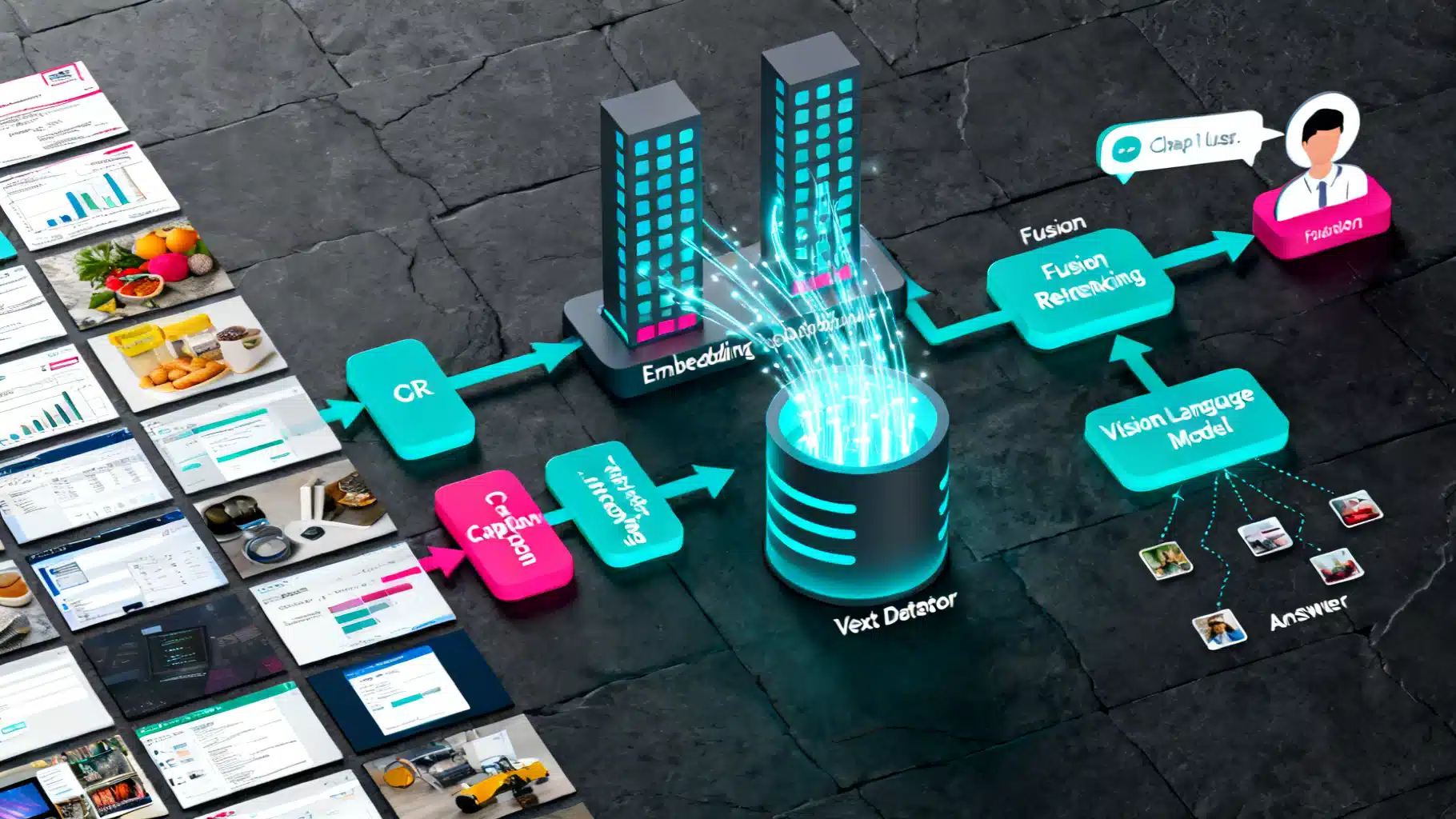
Image used for representation purposes only.
Overview
Multi‑modal Retrieval‑Augmented Generation (RAG) extends classic text‑only RAG by letting a model retrieve and reason over both images and text. In this tutorial you will build an end‑to‑end pipeline that:
- Ingests images and documents
- Extracts text with OCR and generates captions
- Embeds images and text into a shared vector space
- Retrieves relevant items for a user query (text or image)
- Fuses results from multiple signals (image, caption, OCR)
- Generates a grounded answer with a vision‑language model (VLM)
Use cases include searching design catalogs by sketch and description, answering questions about receipts or forms, explaining dashboards or charts, and visual help‑center assistants that understand UI screenshots.
Architecture at a glance
A practical multi‑modal RAG system has 6 layers:
- Ingest
- Accepted inputs: PNG/JPG images, PDFs, and text files
- Store originals in blob storage; track metadata such as source, timestamp, page number, bounding boxes
- Preprocess
- OCR for text inside images and scanned PDFs (e.g., Tesseract, PaddleOCR)
- Image captioning for scene‑level semantics (e.g., BLIP‑style models)
- Optional tiling for large images; split PDFs by page
- Embed
- Text encoder for text chunks and captions
- Image encoder for global image vectors (CLIP‑style, OpenCLIP)
- Optional region‑level embeddings using detected boxes
- Index
- Vector database (FAISS locally or Qdrant/Milvus/Weaviate in production)
- Separate indices per modality: image, caption, OCR text; keep a relational mapping back to the same asset
- Retrieve and fuse
- Given a query (text or image), run multiple retrievers
- Normalize scores, apply Reciprocal Rank Fusion (RRF) or weighted sum
- Optional reranking with a stronger cross‑modal scorer
- Generate
- Hand the top‑k retrieved context (images + text snippets) to a VLM
- Constrain the model to cite evidence and avoid hallucinations
Data preparation
Good retrieval demands thoughtful chunking and metadata.
-
Images
- Keep a global image vector per asset
- For dense scenes or documents, tile into overlapping crops and index each crop (store crop coordinates)
- Save captions and OCR text alongside the image id
-
Text
- Chunk long text to 256‑512 tokens with overlap
- Track source, page, section, and confidence scores
-
Metadata
- width, height, dpi
- OCR language, avg confidence
- Captioning model used and version
Embedding strategies
Pick one or combine several strategies depending on your data and latency budget.
- Dual‑encoder image↔text retrieval (CLIP‑style)
- Pros: fast ANN search; supports cross‑modal queries out of the box
- Cons: struggles with dense text in documents; can miss fine‑grained details
- OCR‑first indexing
- Run OCR and index the extracted text using a strong text encoder
- Pros: precise when the question targets specific words, numbers, or fields
- Cons: OCR errors; layout and figures without text are hard
- Image captioning + text retrieval
- Generate one or more captions per image (short global, detailed long)
- Index captions in a text vector store
- Pros: bridges visual content into text space; better with semantic or style queries
- Cons: captions may omit crucial details
Most robust systems combine all three: CLIP for semantics, OCR for literal strings, captions for context.
Vector store choices
- FAISS: fast, simple local prototyping; IVF or HNSW for scale; PQ for memory savings
- Qdrant/Milvus/Weaviate: production‑grade, HNSW‑based ANN, filters, payload metadata, horizontal scale
- Similarity metric: cosine or inner product; normalize vectors for cosine‑like behavior
Retrieval orchestration and fusion
Given a user text query like: find the invoice with total 129.50 that mentions ACME and a red logo
- Run three retrievers:
- Text→OCR store (exact numbers and names)
- Text→caption store (semantic cues like red logo, invoice)
- Text→image store with CLIP (visual style and layout)
- Normalize scores to [0,1] (z‑score or min‑max)
- Fuse with Reciprocal Rank Fusion (robust) or a learned weighted sum
- Optional rerank: compute CLIP similarity at higher resolution for top‑N, or use a cross‑encoder VLM to score text‑image pairs
For image queries (query‑by‑image), embed the query image and search the image index; optionally expand with a caption generated from the query image and search the caption/OCR stores too.
Generation with a VLM
After retrieval, pass to a VLM that can accept both images and text. Construct a prompt that:
- Lists the user question
- Includes the top‑k evidence items: small thumbnails or URLs for images plus OCR and caption text
- Instructs the model to answer strictly from evidence and cite the ids of used items
Prompt sketch:
- System: You are a visual analyst. Only answer using the provided evidence. If uncertain, say you do not know.
- User: question
- Context: k entries with image references, captions, OCR snippets, and metadata
Step‑by‑step implementation
The example below uses widely available open‑source pieces for a local prototype. Adjust models to suit your stack.
Setup
# vision and NLP
pip install pillow sentence-transformers torchvision transformers timm
# indexing and OCR
pip install faiss-cpu pytesseract
# captioning utils (optional)
pip install accelerate
Ingestion and preprocessing
import os, json, uuid, pathlib
from PIL import Image
import pytesseract

DATA_DIR = 'data/assets'  # images and pdf pages already split as images
os.makedirs('artifacts', exist_ok=True)

records = []
for fp in pathlib.Path(DATA_DIR).glob('**/*.*'):
    if fp.suffix.lower() in {'.png', '.jpg', '.jpeg'}:
        img = Image.open(fp).convert('RGB')
        # OCR (simple baseline)
        ocr_text = pytesseract.image_to_string(img)
        rec = {
            'id': str(uuid.uuid4()),
            'path': str(fp),
            'ocr_text': ocr_text.strip(),
            'meta': {
                'source': 'local-demo',
                'filename': fp.name
            }
        }
        records.append(rec)

with open('artifacts/records.jsonl', 'w') as f:
    for r in records:
        f.write(json.dumps(r) + '\n')
Image captioning (optional but powerful)
from transformers import AutoProcessor, BlipForConditionalGeneration
import torch

cap_model_name = 'Salesforce/blip-image-captioning-base'  # pick any BLIP captioner available locally
processor = AutoProcessor.from_pretrained(cap_model_name)
cap_model = BlipForConditionalGeneration.from_pretrained(cap_model_name)
cap_model.eval()

for r in records:
    img = Image.open(r['path']).convert('RGB')
    inputs = processor(images=img, return_tensors='pt')
    with torch.no_grad():
        out = cap_model.generate(**inputs, max_new_tokens=40)
    r['caption'] = processor.tokenizer.decode(out[0], skip_special_tokens=True)
Multi‑modal embeddings with CLIP
Using sentence‑transformers makes CLIP embeddings convenient for both text and images.
import numpy as np
from sentence_transformers import SentenceTransformer
from PIL import Image
import faiss

clip_model = SentenceTransformer('clip-ViT-B-32')

# Build three indices: images, captions, OCR text
img_vecs, cap_vecs, ocr_vecs = [], [], []
img_ids, cap_ids, ocr_ids = [], [], []

for r in records:
    img = Image.open(r['path']).convert('RGB')
    ivec = clip_model.encode([img], batch_size=1, convert_to_numpy=True, normalize_embeddings=True)[0]
    img_vecs.append(ivec); img_ids.append(r['id'])

    if r.get('caption'):
        cvec = clip_model.encode([r['caption']], convert_to_numpy=True, normalize_embeddings=True)[0]
        cap_vecs.append(cvec); cap_ids.append(r['id'])

    if r.get('ocr_text'):
        ovec = clip_model.encode([r['ocr_text']], convert_to_numpy=True, normalize_embeddings=True)[0]
        ocr_vecs.append(ovec); ocr_ids.append(r['id'])

img_mat = np.vstack(img_vecs).astype('float32')
cap_mat = np.vstack(cap_vecs).astype('float32') if cap_vecs else np.zeros((0, img_mat.shape[1]), dtype='float32')
ocr_mat = np.vstack(ocr_vecs).astype('float32') if ocr_vecs else np.zeros((0, img_mat.shape[1]), dtype='float32')

# FAISS inner product indices (embeddings already normalized)
img_index = faiss.IndexFlatIP(img_mat.shape[1]); img_index.add(img_mat)
cap_index = faiss.IndexFlatIP(img_mat.shape[1]);
ocr_index = faiss.IndexFlatIP(img_mat.shape[1]);
if cap_mat.shape[0] > 0: cap_index.add(cap_mat)
if ocr_mat.shape[0] > 0: ocr_index.add(ocr_mat)
Retrieval and fusion
from collections import defaultdict
import numpy as np

def rrf(ranked_ids, k=60):
    # ranked_ids: list of lists of ids in rank order
    scores = defaultdict(float)
    for lst in ranked_ids:
        for rank, _id in enumerate(lst, start=1):
            scores[_id] += 1.0 / (k + rank)
    return sorted(scores.items(), key=lambda x: x[1], reverse=True)

# text query example
query = 'invoice mentioning ACME with red logo total 129.50'
q_vec = clip_model.encode([query], convert_to_numpy=True, normalize_embeddings=True).astype('float32')

k = 10
D_img, I_img = img_index.search(q_vec, k)
D_cap, I_cap = (np.array([[]]), np.array([[]])) if cap_index.ntotal == 0 else cap_index.search(q_vec, k)
D_ocr, I_ocr = (np.array([[]]), np.array([[]])) if ocr_index.ntotal == 0 else ocr_index.search(q_vec, k)

rank_lists = []
rank_lists.append([img_ids[i] for i in I_img[0] if i != -1])
if cap_index.ntotal: rank_lists.append([cap_ids[i] for i in I_cap[0] if i != -1])
if ocr_index.ntotal: rank_lists.append([ocr_ids[i] for i in I_ocr[0] if i != -1])

fused = rrf(rank_lists)
results = [rid for rid, _ in fused[:k]]
Generation stub with a VLM
Plug in your preferred VLM. The function below shows the interface you will need.
def vlm_answer(question, evidence):
    # evidence: list of dicts with 'path', 'caption', 'ocr_text'
    # Replace with your VLM call; pass images and a structured prompt
    context_lines = []
    for i, e in enumerate(evidence, 1):
        line = f'[item {i}] file={os.path.basename(e["path"])} caption={e.get("caption", "")} ocr={e.get("ocr_text", "")[:200]}'
        context_lines.append(line)
    prompt = (
        'You are a visual analyst. Answer only using the evidence items below. '
        'Cite item numbers used. If unsure, say you do not know.\n\n'
        + '\n'.join(context_lines) + f'\n\nQuestion: {question}\nAnswer:'
    )
    # return call_to_vlm(images=[Image.open(e['path']) for e in evidence], prompt=prompt)
    return '(demo) cite items [1,2]; total appears as 129.50 and vendor ACME.'

evidence = [next(r for r in records if r['id'] == rid) for rid in results[:3]]
print(vlm_answer(query, evidence))
Notes
- In production, stream thumbnails or signed URLs instead of raw images
- Use a VLM that accepts multiple images and long context; otherwise chunk evidence across multiple rounds
Evaluation
Measure retrieval first, then end‑to‑end generation.
-
Retrieval metrics
- Recall@k and NDCG@k for text→image, text→OCR, and image→image
- Build a small labeled set: each query lists relevant item ids
- Compare single‑signal vs fused retrieval
-
Generation metrics
- Human evaluation for factuality and citation correctness
- Task‑specific checks: numeric fields matched, key entities extracted
-
Ablations to try
- With vs without captions
- OCR confidence thresholds and language packs
- Tiling settings for large documents or dashboards
Latency, cost, and scaling
- Precompute and cache all embeddings; persist in your vector DB
- Use approximate indices (HNSW/IVF) and float16 or product quantization to reduce memory
- Batch encode images and texts on GPU; enable pinned memory and dataloader workers
- Limit evidence to the minimal set that answers the question; rerank top‑50 to top‑5
- Compress OCR text with sentence selection before handing to the generator
Guardrails and quality
- Safety: filter NSFW or sensitive imagery before indexing
- Privacy: redact PII in OCR text when required; separate public and private collections
- Freshness: stamp each asset with timestamps; add a recency prior in fusion
- Observability: log queries, retrieved ids, scores, and selected evidence; capture model output with citations
Troubleshooting checklist
-
Recall is low on exact fields
- Improve OCR (language packs, denoise, thresholding, rotation)
- Add an exact‑match keyword search over OCR text alongside vector search
-
Semantics are missed despite good OCR
- Add or improve captions; generate 2‑3 diverse captions per image
- Fine‑tune CLIP on in‑domain pairs if feasible
-
The generator hallucinates
- Tighten the prompt to require citations
- Post‑verify answers by re‑checking cited evidence items
-
Latency is too high
- Reduce top‑k per retriever before fusion
- Quantize indices and batch VLM inference
What to build next
- Region‑aware retrieval: detect key fields and index region crops with coordinates; show highlighted boxes in answers
- Layout‑aware embeddings for documents and forms
- Learned fusion: train a light model to predict relevance from features such as scores, caption length, OCR confidence, and recency
Conclusion
Multi‑modal RAG combines the strengths of vision and language systems: images anchor visual evidence, OCR preserves literal strings, and captions provide semantic glue. With a modest stack built from OCR, a captioner, CLIP embeddings, and a vector index, you can answer rich, grounded questions about visual data. Start simple with the baseline above, add fusion and reranking, and evolve toward region‑aware retrieval and robust VLM reasoning as your use cases grow.
Related Posts
Gemini API Multimodal Tutorial (Python & JavaScript): Images, Video, JSON, Tools, and Live Streaming
Build a multimodal app with the Gemini API: text+image, YouTube video, structured JSON, function calling, and Live API streaming (Python & JS).
Advanced Chunking Strategies for Retrieval‑Augmented Generation
A practical guide to advanced chunking in RAG: semantic and structure-aware methods, parent–child indexing, query-driven expansion, and evaluation tips.
The Engineer’s Guide to Multi-Modal AI API Integration
A practical, production-ready guide to integrating multi-modal AI APIs—covering architecture, streaming, function calling, safety, cost, and reliability.