
React State Machines with XState: A Practical Tutorial
Build predictable React apps with XState. Learn v5 basics: machines, context, guards, async actors, nesting, parallel states, and testing.
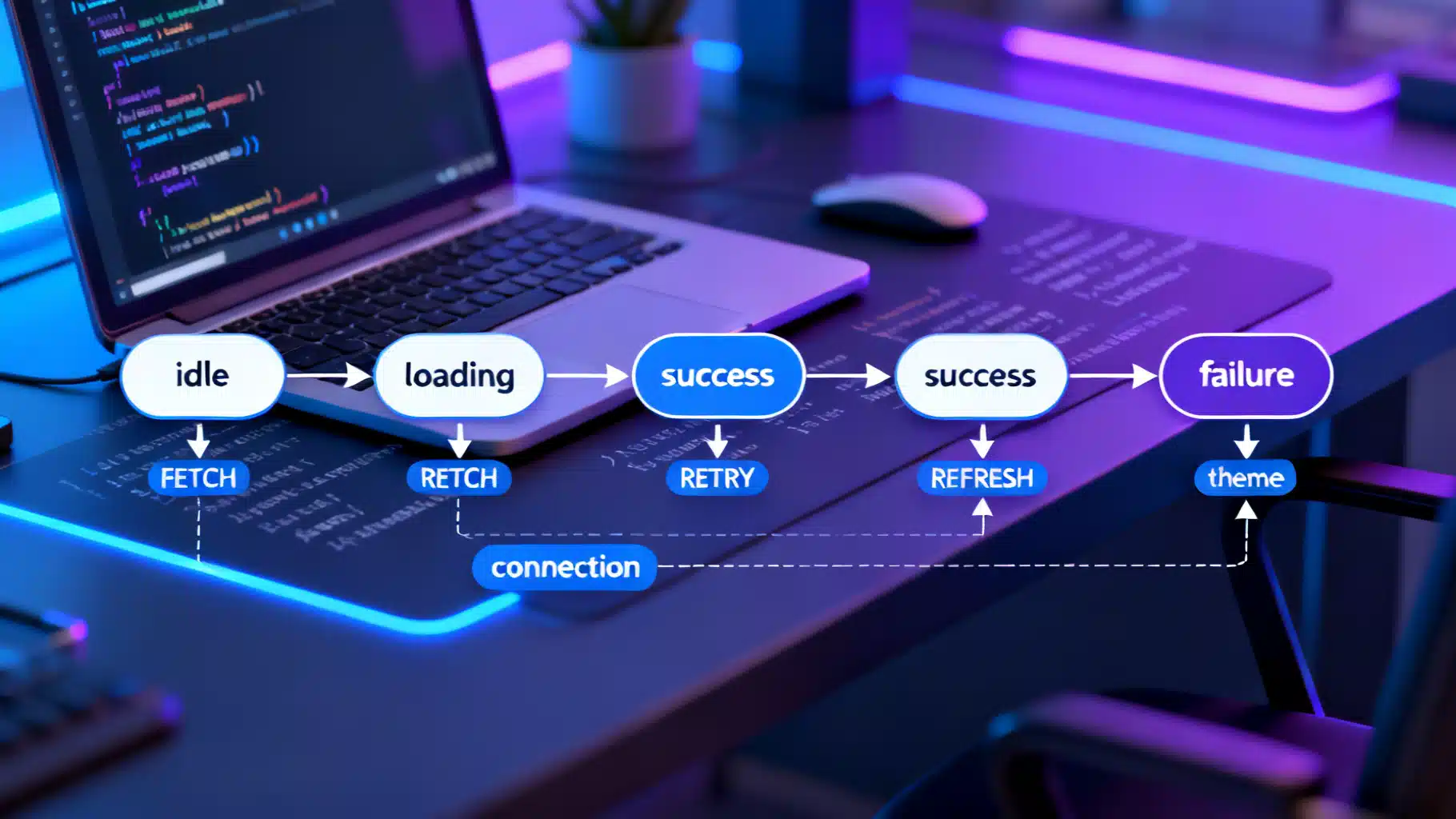
Image used for representation purposes only.
Why state machines in React
React gives you powerful primitives for rendering UI, but as features grow, managing all the “what ifs” with booleans, effects, and reducers becomes fragile. State machines and statecharts provide a precise, visual, and testable way to model behavior. With XState, you describe every possible state, how to transition between them, and what side effects (like fetching data) should run, all in one place.
What you gain:
- A single source of truth for behavior
- Fewer edge‑case bugs and race conditions
- Built‑in support for async work, retries, timeouts, and parallel flows
- Better tests and easier refactors
This tutorial walks through building React features with XState (v5 concepts), from a toggle to async workflows, guards, nested/parallel states, and composition.
Installation and project setup
Install the libraries:
npm i xstate @xstate/react
# or
yarn add xstate @xstate/react
You’ll use:
- xstate for machines, actions, guards, and actors
- @xstate/react for the useMachine and related hooks
Your first machine: a toggle
A tiny example shows the core idea: enumerate states and transitions.
// machines/toggleMachine.ts
import { createMachine } from 'xstate';

export const toggleMachine = createMachine({
  id: 'toggle',
  initial: 'inactive',
  states: {
    inactive: { on: { TOGGLE: 'active' } },
    active: { on: { TOGGLE: 'inactive' } }
  }
});
Use it in React:
// components/Toggle.tsx
import * as React from 'react';
import { useMachine } from '@xstate/react';
import { toggleMachine } from '../machines/toggleMachine';

export function Toggle() {
  const [state, send] = useMachine(toggleMachine);

  return (
    <button onClick={() => send({ type: 'TOGGLE' })}>
      {state.matches('active') ? 'On' : 'Off'}
    </button>
  );
}
Key points:
- state.matches(‘active’) is a semantic check; no boolean juggling.
- Every transition is explicit and testable.
Context, actions, and guards
Context stores extended data; actions update it; guards allow/deny transitions.
// machines/counterMachine.ts
import { createMachine, assign } from 'xstate';

type Ctx = { count: number };

type Ev =
  | { type: 'INC' }
  | { type: 'DEC' }
  | { type: 'RESET' };

export const counterMachine = createMachine<Ctx, Ev>({
  id: 'counter',
  context: { count: 0 },
  on: {
    INC: { actions: assign({ count: ({ context }) => context.count + 1 }) },
    DEC: {
      guard: 'canDecrement',
      actions: assign({ count: ({ context }) => context.count - 1 })
    },
    RESET: { actions: assign({ count: () => 0 }) }
  }
}, {
  guards: {
    canDecrement: ({ context }) => context.count > 0
  }
});
In React:
import { useMachine } from '@xstate/react';
import { counterMachine } from '../machines/counterMachine';

export function Counter() {
  const [state, send] = useMachine(counterMachine);
  const { count } = state.context;

  return (
    <div>
      <button onClick={() => send({ type: 'DEC' })}>−</button>
      <span>{count}</span>
      <button onClick={() => send({ type: 'INC' })}>+</button>
      <button onClick={() => send({ type: 'RESET' })}>Reset</button>
    </div>
  );
}
Tips:
- assign is a pure function; no mutations.
- guard prevents invalid transitions before any action runs.
Handling async with actors (invoke)
XState treats async work as actors you “invoke” from states. When the actor resolves or rejects, the machine receives onDone or onError events.
// machines/userMachine.ts
import { createMachine, assign, fromPromise } from 'xstate';

type User = { id: number; name: string };

type Ctx = {
  userId: number;
  data: User | null;
  error: string | null;
};

type Ev =
  | { type: 'FETCH' }
  | { type: 'REFRESH' }
  | { type: 'RETRY' };

export const userMachine = createMachine<Ctx, Ev>({
  id: 'user',
  context: { userId: 1, data: null, error: null },
  initial: 'idle',
  states: {
    idle: {
      on: { FETCH: 'loading' }
    },
    loading: {
      invoke: {
        src: 'fetchUser',
        input: ({ context }) => ({ id: context.userId }),
        onDone: {
          target: 'success',
          actions: assign({
            data: ({ event }) => event.output, // resolved value
            error: () => null
          })
        },
        onError: {
          target: 'failure',
          actions: assign({ error: ({ event }) => String(event.error) })
        }
      }
    },
    success: {
      on: { REFRESH: 'loading' },
      after: {
        // Auto-refresh after 60s
        60000: { target: 'loading' }
      }
    },
    failure: {
      on: { RETRY: 'loading' }
    }
  }
}, {
  actors: {
    fetchUser: fromPromise(async ({ input }: { input: { id: number } }) => {
      const res = await fetch(`/api/users/${input.id}`);
      if (!res.ok) throw new Error('Network error');
      return res.json() as Promise<User>;
    })
  }
});
In React:
import { useMachine } from '@xstate/react';
import { userMachine } from '../machines/userMachine';

export function Profile() {
  const [state, send] = useMachine(userMachine);

  if (state.matches('idle')) {
    return <button onClick={() => send({ type: 'FETCH' })}>Load Profile</button>;
  }

  if (state.matches('loading')) return <p>Loading…</p>;

  if (state.matches('failure')) {
    return (
      <div>
        <p role="alert">{state.context.error}</p>
        <button onClick={() => send({ type: 'RETRY' })}>Try again</button>
      </div>
    );
  }

  return (
    <div>
      <h2>{state.context.data?.name}</h2>
      <button onClick={() => send({ type: 'REFRESH' })}>Refresh</button>
    </div>
  );
}
Notes:
- In XState v5, the resolved value is on event.output and errors are on event.error.
- after allows time-based transitions; you can also name delays via the delays option.
Debouncing, timeouts, and delays
You can model debounced inputs and timeouts without ad‑hoc timers.
import { createMachine } from 'xstate';

export const searchMachine = createMachine({
  context: { query: '' },
  initial: 'idle',
  states: {
    idle: {},
    typing: {
      after: { 300: { target: 'ready' } } // debounce 300ms
    },
    ready: {}
  },
  on: {
    CHANGE: {
      target: 'typing',
      actions: [
        ({ context, event }) => {
          // keep it pure; replace with assign in real code
          (context as any).query = (event as any).value;
        }
      ]
    }
  }
});
Tip: Prefer assign for updating context; inline functions shown for brevity.
Hierarchical (nested) states
Complex flows are easier when split into nested substates.
// A multi-step form with validation during the "editing" phase
import { createMachine, assign } from 'xstate';

export const formMachine = createMachine({
  context: { values: { email: '' }, error: '' as string | null },
  initial: 'editing',
  states: {
    editing: {
      initial: 'idle',
      states: {
        idle: {},
        validating: {
          invoke: {
            src: 'validate',
            input: ({ context }) => context.values,
            onDone: { target: '#form.submitting' },
            onError: {
              target: 'idle',
              actions: assign({ error: ({ event }) => String(event.error) })
            }
          }
        }
      },
      on: {
        CHANGE: { actions: assign({ values: ({ event, context }) => ({ ...context.values, ...(event as any).values }) }) },
        NEXT: '.validating'
      }
    },
    submitting: {
      id: 'form.submitting',
      invoke: {
        src: 'submit',
        input: ({ context }) => context.values,
        onDone: 'success',
        onError: {
          target: 'editing.idle',
          actions: assign({ error: ({ event }) => String(event.error) })
        }
      }
    },
    success: {}
  }
}, {
  actors: {
    validate: fromPromise(async ({ input }: { input: { email: string } }) => {
      if (!/^[^@]+@[^@]+\.[^@]+$/.test(input.email)) throw new Error('Invalid email');
      return true;
    }),
    submit: fromPromise(async () => true)
  }
});
Notice the relative transition ‘.validating’ and the absolute id reference ‘#form.submitting’. These make complex flows readable and maintainable.
Parallel states
Sometimes UI has independent concerns that should run side‑by‑side.
import { createMachine } from 'xstate';

export const appMachine = createMachine({
  type: 'parallel',
  states: {
    connection: {
      initial: 'offline',
      states: {
        offline: { on: { CONNECT: 'online' } },
        online: { on: { DISCONNECT: 'offline' } }
      }
    },
    theme: {
      initial: 'light',
      states: {
        light: { on: { TOGGLE_THEME: 'dark' } },
        dark: { on: { TOGGLE_THEME: 'light' } }
      }
    }
  }
});
Each region evolves independently, yet you keep a single, holistic snapshot of app behavior.
Composing with child actors
Instead of giant machines, compose smaller ones. You can invoke a child machine or a callback/interval.
import { createMachine, fromCallback } from 'xstate';

export const tickerMachine = createMachine({
  initial: 'running',
  states: {
    running: {
      invoke: {
        src: 'ticker' // sends TICK every second
      },
      on: { TICK: {} }
    }
  }
}, {
  actors: {
    ticker: fromCallback(({ sendBack }) => {
      const id = setInterval(() => sendBack({ type: 'TICK' }), 1000);
      return () => clearInterval(id);
    })
  }
});
You can invoke tickerMachine inside larger flows, or use multiple child actors for complex orchestration.
React integration patterns
- Co-locate a machine per feature folder (machines/, components/).
- Derive rendering from state.matches and state.context only.
- Prefer useSelector from @xstate/react for performance when only a slice of context is needed.
Example with a selector:
import { useMachine, useSelector } from '@xstate/react';
import { counterMachine } from '../machines/counterMachine';

export function OptimizedCounter() {
  const [state, send, actor] = useMachine(counterMachine);
  const count = useSelector(actor, (s) => s.context.count);
  return (
    <div>
      <button onClick={() => send({ type: 'DEC' })}>−</button>
      <span>{count}</span>
      <button onClick={() => send({ type: 'INC' })}>+</button>
    </div>
  );
}
Testing with actors
Machines are framework‑agnostic, so you can test behavior without rendering components.
import { createActor } from 'xstate';
import { counterMachine } from '../machines/counterMachine';

it('increments and resets', () => {
  const actor = createActor(counterMachine).start();
  actor.send({ type: 'INC' });
  actor.send({ type: 'INC' });
  expect(actor.getSnapshot().context.count).toBe(2);
  actor.send({ type: 'RESET' });
  expect(actor.getSnapshot().context.count).toBe(0);
});
You can also assert transitions: expect(actor.getSnapshot().matches(‘some.state’)).
Debugging and visualization
- Log transitions with simple actions or integrate devtools/inspectors to watch events and states in real time.
- Export/import machines to visual editors to communicate flows with designers and PMs.
Migration and version notes
- In XState v5, use guard instead of cond.
- Invoked actors resolve to event.output and reject to event.error.
- Prefer fromPromise/fromCallback for async definitions and side‑effectful listeners.
If you’re on an older version, check the official migration notes before copying snippets.
Practical checklist
- Enumerate the real states first; avoid “boolean soup”.
- Keep actions pure; prefer assign for context updates.
- Use guards to reject impossible transitions early.
- Model async with invoke; handle onDone/onError.
- Split complexity with nested and parallel states.
- Test behavior with createActor; render is a separate concern.
Wrap‑up
State machines make complex React behavior predictable. With XState, you describe how your UI should evolve, not just when to set state. Start with a small feature, move one async flow at a time, and grow a library of reusable machines you can test, visualize, and trust.
Related Posts
React i18n Internationalization Tutorial: From Zero to Production
Learn React i18n with i18next: setup, plurals, formatting, RTL, lazy loading, testing, and best practices for production-ready localization.

Building an Accessible React Portal Modal with TypeScript
Build an accessible React portal modal with TypeScript: focus trap, Escape handling, scroll locking, SSR safety, and tests with RTL.
React Error Boundaries: A Complete Implementation Guide
Implement robust React error boundaries with TypeScript examples, reset strategies, logging, Suspense interplay, testing, and accessibility.