
Build an AI Meeting Transcription API: An End-to-End Tutorial
Build a production-ready AI meeting transcription API with streaming, diarization, summaries, and exports. Code samples and architecture included.
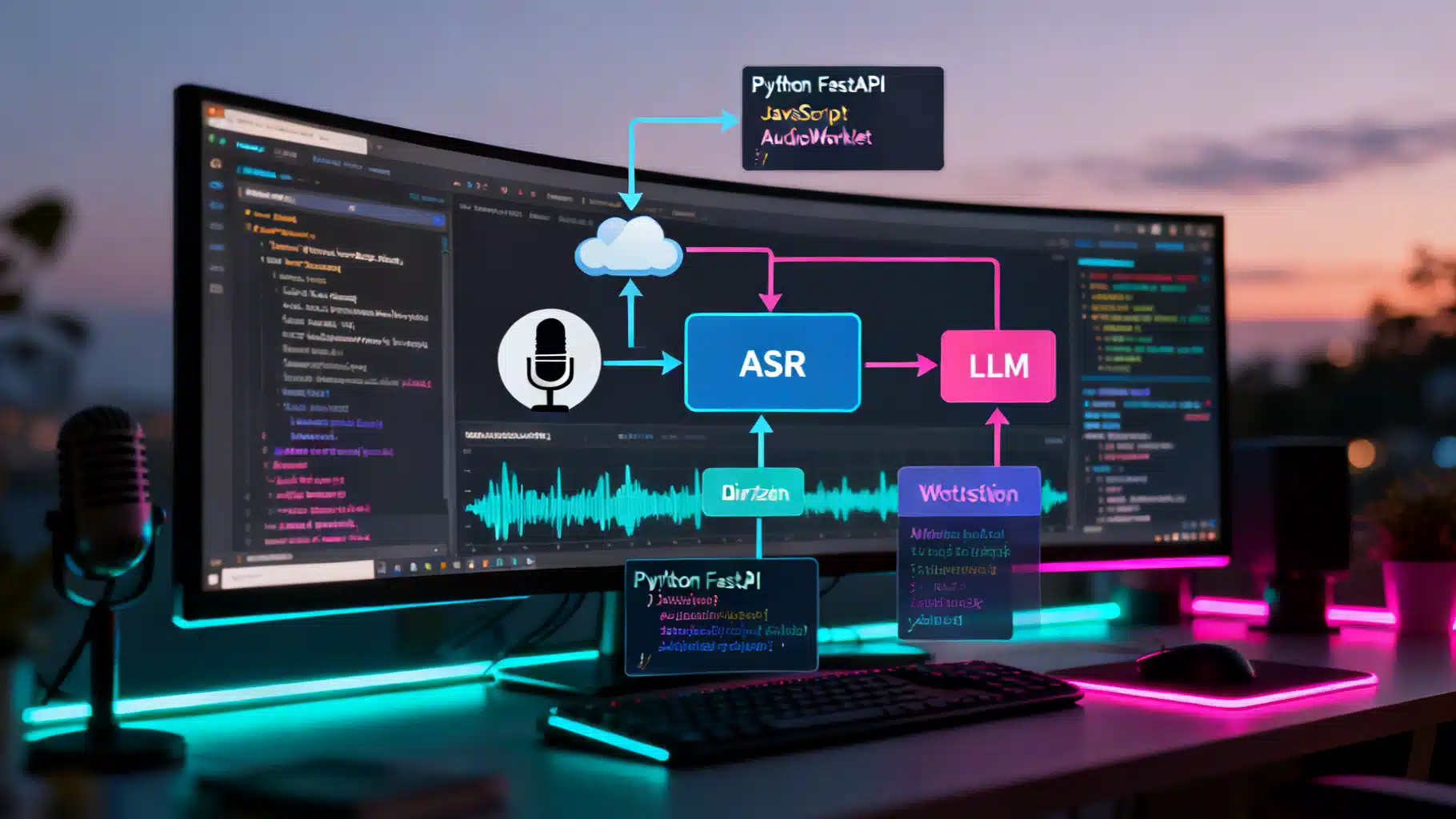
Image used for representation purposes only.
Overview
This hands-on tutorial walks you through building a production-ready AI meeting transcription API. You will design clean REST and WebSocket interfaces, wire in a speech-to-text (ASR) engine, add diarization (who spoke when), and generate meeting summaries and action items with an LLM. We will also cover exports (SRT/VTT), quality evaluation, security, and scaling.
What you will build:
- Batch transcription endpoint for recorded meetings
- Real-time streaming transcription over WebSocket for live captions
- Optional diarization and word-level timestamps
- Post-processing: punctuation, normalization, and redaction
- Summaries, topics, action items, and highlights
- Exports to JSON, SRT, and VTT
This tutorial is provider-agnostic. Plug in the ASR and LLM engines you prefer (cloud or on-prem). Code samples use Python (FastAPI) on the server and browser JavaScript on the client.
Architecture at a Glance
The system has four layers:
- Ingestion
- Batch: storage URL (e.g., cloud object store) or direct upload
- Streaming: WebSocket sends small audio chunks from the browser or softphone
- Processing
- Decoder: normalize audio to 16 kHz, mono PCM
- ASR: transcribe (streaming or batch)
- Diarization: detect speakers and assign segments
- Post-processing: punctuation, capitalization, profanity masking, PII redaction
- Intelligence
- Summarize and extract topics, action items, decisions, and follow-ups
- Confidence scores, timestamps, and search-ready JSON
- Delivery
- REST to fetch JSON
- SRT/VTT for captions
- Webhooks for job completion
Prerequisites
- Python 3.10+
- FastAPI and Uvicorn
- ffmpeg installed on the server
- An ASR engine (cloud SDK or local library) with streaming and/or batch support
- An LLM provider (cloud or local) for summaries and action items
Install base dependencies:
pip install fastapi uvicorn websockets pydantic[dotenv] httpx orjson
Optional libraries you may use behind the adapter interfaces:
- ASR: faster-whisper, Vosk, cloud SDKs
- Diarization: pyannote.audio (offline), vendor diarization
- Redaction: custom regex or NER models
API Design
REST (Batch)
- POST /v1/transcripts: create a transcription job
- GET /v1/transcripts/{id}: get job status and results
- GET /v1/transcripts/{id}.srt: export SRT
- GET /v1/transcripts/{id}.vtt: export VTT
- Optional: POST /v1/webhooks/test for integration checks
Request example:
{
  "audio_url": "https://storage.example.com/meetings/abc123.m4a",
  "diarize": true,
  "language": "en",
  "redact_pii": true,
  "summarize": true
}
Response (202 Accepted):
{
  "id": "job_e2c1b4",
  "status": "queued"
}
WebSocket (Streaming)
- wss://api.example.com/v1/stream
- Client sends small audio chunks (e.g., 20–60 ms) and control messages
- Server replies with partial and final segments, including timestamps and speaker labels (if available)
Client-to-server JSON control message:
{ "type": "start", "sample_rate": 16000, "language": "en", "diarize": true }
Server-to-client transcript frame (partial):
{
  "type": "partial",
  "seq": 42,
  "start": 12.36,
  "end": 13.10,
  "text": "we should move the deadline",
  "speaker": "S1",
  "confidence": 0.87
}
Final segment uses type: "final". The server sends type: "summary" at the end if summarization is enabled.
Implementing the Server (FastAPI)
Define adapter interfaces so you can swap engines without rewriting your API.
# adapters/asr.py
from typing import Iterable, List, Dict, Any

class ASRStreaming:
    async def start(self, sample_rate: int, language: str | None = None):
        ...
    async def accept(self, pcm16_bytes: bytes) -> List[Dict[str, Any]]:
        """Return zero or more partial segments with timestamps."""
        ...
    async def finalize(self) -> List[Dict[str, Any]]:
        """Return final segments."""
        ...

class ASRBatch:
    async def transcribe(self, wav_path: str, language: str | None = None) -> Dict:
        ...
# adapters/diarization.py
from typing import List, Dict

async def diarize(wav_path: str) -> List[Dict]:
    """Return speaker segments: [{speaker: "S1", start: 0.0, end: 5.2}, ...]"""
    ...
# adapters/llm.py
from typing import Dict, List

SUMMARY_PROMPT = (
    "You are an assistant that writes faithful, concise meeting summaries.\n"
    "Use the transcript to produce: 1) executive summary (5 bullets),\n"
    "2) decisions, 3) action items with owners and dates, 4) risks/blockers.\n"
    "Cite timecodes for each decision/action item when possible.\n"
)

async def summarize(transcript: List[Dict]) -> Dict:
    # Call your preferred LLM here and return a structured dict
    return {"summary": "...", "actions": [], "decisions": []}
Utilities: Audio Normalization
# utils/audio.py
import subprocess, tempfile, os

FFMPEG = "ffmpeg"

def to_wav_pcm16_mono_16k(src_path: str) -> str:
    dst = tempfile.mktemp(suffix=".wav")
    cmd = [
        FFMPEG, "-y", "-i", src_path,
        "-ac", "1", "-ar", "16000", "-f", "wav", "-acodec", "pcm_s16le",
        dst,
    ]
    subprocess.check_call(cmd)
    return dst
FastAPI Endpoints (Batch)
# main.py
from fastapi import FastAPI, HTTPException, BackgroundTasks
from pydantic import BaseModel
import orjson, uuid, os
from utils.audio import to_wav_pcm16_mono_16k
from adapters.asr import ASRBatch
from adapters.diarization import diarize
from adapters.llm import summarize
import httpx

app = FastAPI()
JOBS: dict[str, dict] = {}

class CreateJob(BaseModel):
    audio_url: str
    diarize: bool = False
    language: str | None = None
    redact_pii: bool = False
    summarize: bool = False

asr_batch = ASRBatch()  # plug your engine

async def download(url: str, path: str):
    async with httpx.AsyncClient() as client:
        r = await client.get(url, follow_redirects=True)
        r.raise_for_status()
        with open(path, "wb") as f:
            f.write(r.content)

@app.post("/v1/transcripts")
async def create_job(req: CreateJob, bg: BackgroundTasks):
    job_id = f"job_{uuid.uuid4().hex[:6]}"
    JOBS[job_id] = {"status": "queued"}

    async def worker():
        try:
            tmp = f"/tmp/{job_id}"
            src = tmp + os.path.splitext(req.audio_url)[1]
            await download(req.audio_url, src)
            wav = to_wav_pcm16_mono_16k(src)

            result = await asr_batch.transcribe(wav, req.language)
            segments = result.get("segments", [])

            if req.diarize:
                spk = await diarize(wav)
                segments = align_speakers(segments, spk)

            if req.redact_pii:
                segments = redact(segments)

            output = {"id": job_id, "status": "succeeded", "segments": segments}

            if req.summarize:
                output["intelligence"] = await summarize(segments)

            JOBS[job_id] = output
        except Exception as e:
            JOBS[job_id] = {"id": job_id, "status": "failed", "error": str(e)}

    bg.add_task(worker)
    return {"id": job_id, "status": "queued"}

@app.get("/v1/transcripts/{job_id}")
async def get_job(job_id: str):
    job = JOBS.get(job_id)
    if not job:
        raise HTTPException(404, "not found")
    return job
Support functions used above (speaker alignment and redaction) are sketched next.
from typing import List, Dict

def align_speakers(segments: List[Dict], speakers: List[Dict]) -> List[Dict]:
    # Greedy overlap assignment: pick speaker whose [start,end] overlaps segment midpoint
    def mid(seg):
        return (seg["start"] + seg["end"]) / 2
    out = []
    for seg in segments:
        m = mid(seg)
        spk = next((s["speaker"] for s in speakers if s["start"] <= m <= s["end"]), "S?")
        seg = dict(seg)
        seg["speaker"] = spk
        out.append(seg)
    return out

import re
PII = re.compile(r"(\b\d{3}-?\d{2}-?\d{4}\b|\b\d{5}(?:-\d{4})?\b|\b\d{16}\b)")

def redact(segments: List[Dict]) -> List[Dict]:
    for seg in segments:
        seg["text"] = PII.sub("[REDACTED]", seg["text"])
    return segments
WebSocket for Live Transcription
# main.py (continued)
from fastapi import WebSocket, WebSocketDisconnect
from adapters.asr import ASRStreaming

asr_streaming = ASRStreaming()

@app.websocket("/v1/stream")
async def stream(ws: WebSocket):
    await ws.accept()
    session = None
    try:
        while True:
            msg = await ws.receive()
            if "text" in msg:
                data = orjson.loads(msg["text"]) if msg["text"] else {}
                if data.get("type") == "start":
                    session = await asr_streaming.start(data.get("sample_rate", 16000), data.get("language"))
                    await ws.send_text(orjson.dumps({"type": "started"}).decode())
                elif data.get("type") == "end":
                    finals = await asr_streaming.finalize()
                    await ws.send_text(orjson.dumps({"type": "final", "segments": finals}).decode())
                    break
            elif "bytes" in msg:
                parts = await asr_streaming.accept(msg["bytes"])  # pcm16
                if parts:
                    await ws.send_text(orjson.dumps({"type": "partial_batch", "segments": parts}).decode())
    except WebSocketDisconnect:
        pass
Browser Client: Capturing and Streaming Audio
Below is a minimal client that captures mic audio and streams PCM16 frames.
<button id="start">Start</button>
<button id="stop">Stop</button>
<script>
const startBtn = document.getElementById('start');
const stopBtn = document.getElementById('stop');
let ws, audioCtx, processor, source;

async function start() {
  ws = new WebSocket('wss://api.example.com/v1/stream');
  ws.onopen = () => ws.send(JSON.stringify({type:'start', sample_rate:16000, language:'en'}));

  audioCtx = new (window.AudioContext || window.webkitAudioContext)({sampleRate:16000});
  const stream = await navigator.mediaDevices.getUserMedia({ audio: true });
  source = audioCtx.createMediaStreamSource(stream);
  const worklet = await audioCtx.audioWorklet.addModule('pcm-worklet.js');
  processor = new AudioWorkletNode(audioCtx, 'pcm16-writer');
  processor.port.onmessage = (e) => {
    if (ws.readyState === 1) ws.send(e.data); // ArrayBuffer
  };
  source.connect(processor).connect(audioCtx.destination);
}

function stop() {
  if (ws && ws.readyState === 1) ws.send(JSON.stringify({type:'end'}));
  processor && processor.disconnect();
  source && source.disconnect();
  audioCtx && audioCtx.close();
}

startBtn.onclick = start;
stopBtn.onclick = stop;
</script>
AudioWorklet for PCM16 frames:
// pcm-worklet.js
class PCM16Writer extends AudioWorkletProcessor {
  process(inputs) {
    const input = inputs[0][0];
    if (!input) return true;
    const pcm = new Int16Array(input.length);
    for (let i = 0; i < input.length; i++) {
      const s = Math.max(-1, Math.min(1, input[i]));
      pcm[i] = s < 0 ? s * 0x8000 : s * 0x7FFF;
    }
    this.port.postMessage(pcm.buffer);
    return true;
  }
}
registerProcessor('pcm16-writer', PCM16Writer);
Post-processing and Exports
Generate SRT from segmented transcript:
def to_srt(segments):
    lines = []
    for i, s in enumerate(segments, 1):
        start = srt_time(s['start'])
        end = srt_time(s['end'])
        text = s['text']
        spk = s.get('speaker', '')
        label = f"{spk}: " if spk else ''
        lines.append(f"{i}\n{start} --> {end}\n{label}{text}\n")
    return "\n".join(lines)

def srt_time(t):
    h = int(t // 3600); m = int((t % 3600)//60); s = t % 60
    return f"{h:02}:{m:02}:{int(s):02},{int((s-int(s))*1000):03}"
Add HTTP routes:
@app.get("/v1/transcripts/{job_id}.srt")
async def export_srt(job_id: str):
    job = JOBS.get(job_id)
    if not job or job.get('status') != 'succeeded':
        raise HTTPException(404)
    return to_srt(job['segments'])
Meeting Intelligence with an LLM
Use prompts that request structured outputs. Guardrails to keep it faithful:
- Ask the model to quote timecodes alongside each action/decision
- Provide a strict JSON schema and validate responses
- Include a short transcript excerpt window for each extraction
Example prompt fragment:
System: You extract structured insights from transcripts without inventing facts.
User: Produce JSON with keys: summary, topics[], decisions[], actions[].
Each decision/action must include an array of supporting timecodes.
Post-processing the model output:
- Deduplicate identical action items
- Normalize owners to canonical names if diarization provides speaker maps
- Attach deep links to the media player using timecodes
Quality and Evaluation
Track these metrics continuously:
- Word Error Rate (WER) and Character Error Rate (CER)
- Diarization Error Rate (DER): missed speech, false alarm, confusion
- Real-time Factor (RTF): processing_time / audio_duration
- Time to First Token (TTFT) for streaming captions
- Hallucination rate for summaries (percentage of unsupported claims)
Create a small, representative benchmark from real meetings (with consent). Re-run benchmarks for every engine or prompt change.
Audio Tips for Higher Accuracy
- Prefer 16 kHz mono PCM; avoid overly compressed sources when possible
- Capture separate tracks per participant if you can; mixdown with channel tags
- Use voice activity detection (VAD) to drop long silences and reduce cost
- Enable acoustic echo cancellation on the sender side to limit cross-talk
- Normalize loudness (e.g., -23 LUFS) for consistent decoding
Security, Privacy, and Compliance
- Transport: TLS 1.2+ for all endpoints; use secure WebSocket (wss)
- Storage: encrypt at rest; restrict buckets with IAM policies
- Access: OAuth2 or API keys with rotation; least-privilege roles
- PII: configurable redaction; allow region pinning and data residency
- Retention: short-lived URLs and automatic deletion schedules
- Audit: request/response logging with structured metadata (hash, size, duration)
Scaling and Cost Control
- Use a job queue for batch workloads; autoscale workers on CPU/GPU pools
- Chunk long audios (e.g., 30–60 s windows) with small overlaps; stitch with timestamps
- Cache decoded PCM on ephemeral SSD to avoid repeated transcoding
- Gate expensive LLM calls behind a size threshold or summary-on-demand flag
- For streaming, cap per-connection bitrate and close idle sockets proactively
- Pre-warm models to reduce cold starts; pool GPU sessions when possible
Testing and Monitoring
- Golden tests: fixed audio snippets with pinned expected outputs
- Fuzz tests: random audio segments to catch decoder edge cases
- Synthetics: schedule a test call hourly to validate E2E path
- Observability: emit spans for decode, ASR, diarization, LLM; track errors by cause
- SLIs: success rate, P95 TTFT, P95 completion time, queue age, average cost/minute
Putting It All Together
You now have a clear blueprint and reference implementation for an AI meeting transcription API. Start with the skeleton above, plug in your preferred ASR and LLM adapters, and iterate on quality with real-world audio. Focus early on audio normalization, diarization alignment, and robust exports; then layer on summaries and action items with strict validation. Finally, invest in observability and cost controls to ship a reliable service that scales with your users.
Next Steps
- Implement an actual ASR adapter (e.g., local or cloud)
- Add speaker name mapping UI so users can rename S1, S2 to real names
- Extend exports to DOCX/HTML and add a shareable meeting page
- Build webhook retries with exponential backoff
- Add semantic search over transcripts using embeddings
Related Posts
Build a Production‑Ready Predictive Analytics API: A Step‑by‑Step Tutorial
Build a production-ready predictive analytics API with Python and FastAPI—training, serving, security, testing, and MLOps in one tutorial.
LangChain API Tutorial: From Hello World to Production RAG with FastAPI and LangServe
Build a production-ready LangChain API: LCEL chains, LangServe, FastAPI streaming, RAG, structured outputs, testing, and deployment tips.
Building an AI Email Assistant with APIs: Architecture, Code, and Best Practices
Build a production-ready AI email assistant: architecture, Gmail/Graph integration, LLM prompts, security, reliability, and code examples.