
Anthropic MCP Tool Integration Guide: Build, Package, and Ship
A production‑minded guide to building, securing, and shipping Anthropic MCP tools—TypeScript and Python quickstarts, Claude Desktop packaging, and remote setups.
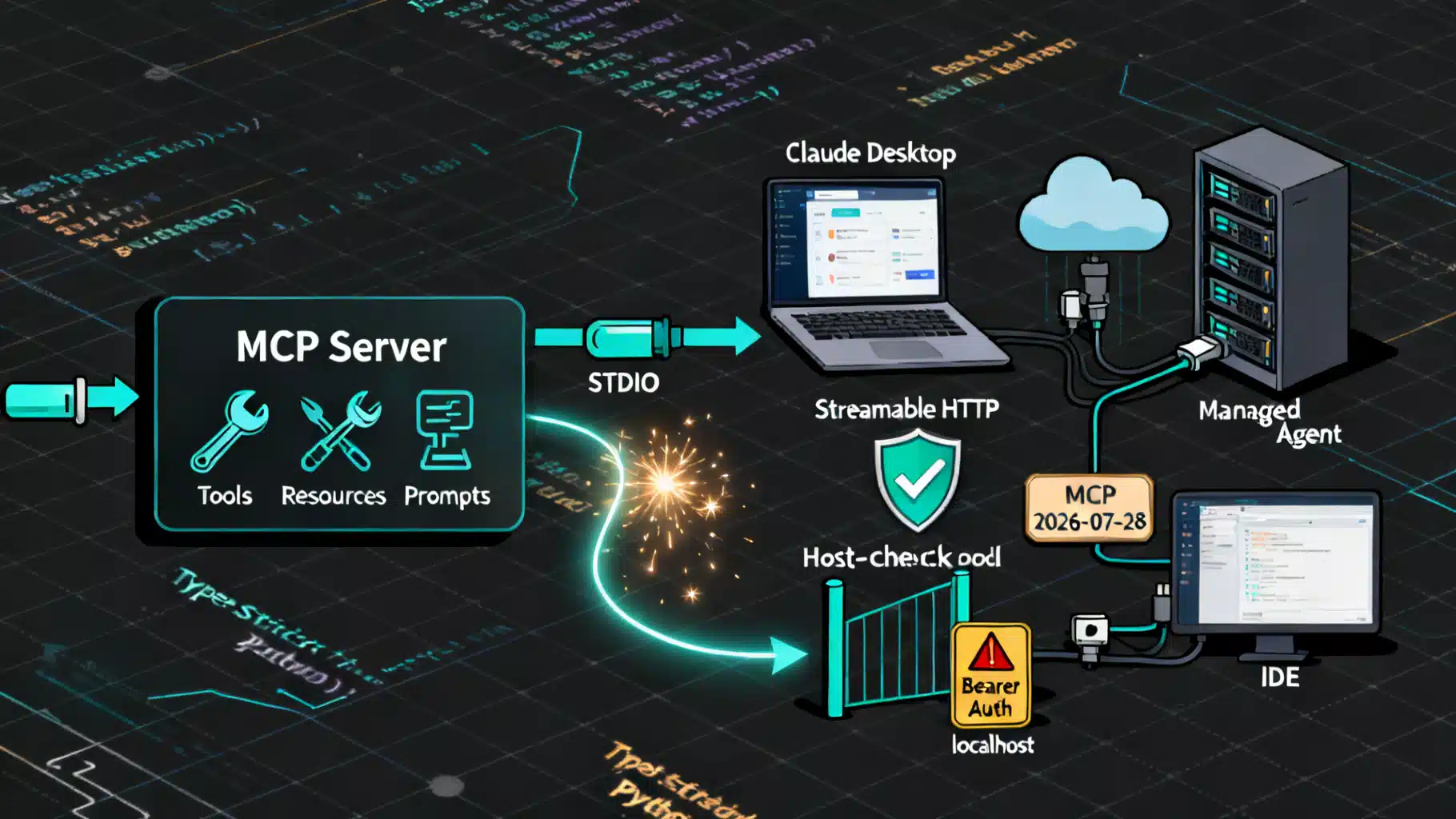
Image used for representation purposes only.
Overview
Anthropic’s Model Context Protocol (MCP) is an open standard for connecting AI assistants to external data sources, tools, and workflows. Think of it as a USB-C port for AI apps: build one server, and multiple MCP‑capable clients can discover its tools and call them safely. As of October 8, 2026, the current public spec line is dated 2026‑07‑28, and MCP enjoys broad ecosystem support across assistants and developer tools. (modelcontextprotocol.io )
This guide shows you how to design, build, ship, and secure MCP servers—then integrate them with Anthropic products such as Claude Desktop and Claude Managed Agents—using TypeScript or Python. We’ll keep to production‑minded patterns and call out version and transport choices where they matter. (ts.sdk.modelcontextprotocol.io )
Architecture in one minute
- Roles
- Client/host: the AI application (e.g., Claude Desktop or a managed agent) that discovers your tools and invokes them.
- Server: your process that advertises tools/resources/prompts and executes requests.
- Capabilities
- Tools: callable functions with typed inputs and structured outputs.
- Resources: URIs your server can list/read (files, records, etc.).
- Prompts: reusable, parameterized message templates.
- Transports
- stdio: simplest local transport where the host spawns your process (great for desktop integrations).
- Streamable HTTP: modern remote transport for production‑grade, resumable sessions and SSE notifications (recommended for remote servers). (ts.sdk.modelcontextprotocol.io )
Plan your integration
Before you write code, decide:
- What tool boundaries make sense? Prefer small, composable tools with clear side‑effects and input validation.
- What transport will you support first?
- Local desktop usage: stdio.
- Organization‑wide or cloud: Streamable HTTP.
- What auth is required? For remote servers, plan for bearer‑token verification at the HTTP layer. (ts.sdk.modelcontextprotocol.io )
Build an MCP server (TypeScript, v2 SDK)
The current TS SDK splits server/client packages and adds first‑class helpers for stdio and Streamable HTTP. Here’s a minimal stdio server that exposes one tool, using Zod for input validation.
// src/index.ts
import { McpServer } from '@modelcontextprotocol/server';
import { serveStdio } from '@modelcontextprotocol/server/stdio';
import * as z from 'zod/v4';

const NWS_API = 'https://api.weather.gov';

function createServer(): McpServer {
  const server = new McpServer({ name: 'weather', version: '1.0.0' });

  server.registerTool(
    'get-alerts',
    {
      description: 'Get active weather alerts for a US state',
      inputSchema: z.object({
        state: z.string().length(2).describe('Two-letter US state code, e.g. CA'),
      }),
    },
    async ({ state }) => {
      const code = state.toUpperCase();
      const res = await fetch(`${NWS_API}/alerts/active?area=${code}`, {
        headers: { 'User-Agent': 'mcp-weather/1.0' },
      });
      if (!res.ok) return { isError: true, content: [{ type: 'text', text: `HTTP ${res.status}` }] };
      const data = await res.json();
      const lines = (data.features ?? []).map((f: any) => f.properties?.headline ?? f.properties?.event ?? 'Alert');
      return { content: [{ type: 'text', text: lines.join('\n') || `No active alerts for ${code}.` }] };
    }
  );

  return server;
}

void serveStdio(createServer);
console.error('weather MCP server running on stdio');
- Initialize and run
- Node.js ≥ 20, then:
- mkdir weather && cd weather
- npm init -y && npm pkg set type=module
- npm install @modelcontextprotocol/server zod tsx
- npx tsx src/index.ts
- Node.js ≥ 20, then:
- Why this shape? registerTool takes a Zod schema; the SDK derives JSON Schema for the host, validates inputs, and types your handler. serveStdio handles the stdio wiring and protocol version negotiation. (ts.sdk.modelcontextprotocol.io )
For remote deployments, switch to the Streamable HTTP server and enable authentication middleware and DNS‑rebind protection when binding to localhost during development. (ts.sdk.modelcontextprotocol.io )
// Express-style hardening snippets (conceptual)
import { createMcpExpressApp } from '@modelcontextprotocol/sdk/server/express.js';
import { requireBearerAuth } from '@modelcontextprotocol/sdk/server/auth/middleware/bearerAuth.js';
const app = createMcpExpressApp();
app.post('/mcp', requireBearerAuth({ verifier: /* your JWT verify fn */ }), /* mcp handler */);
Note: The code block above shows the v1 import paths for concepts only; prefer the v2 server package in new projects and follow its HTTP examples. (ts.sdk.modelcontextprotocol.io )
Build an MCP server (Python, v2 SDK)
The Python SDK embraces simple, type‑hinted handlers and ships a great developer CLI.
# server.py
from mcp.server import MCPServer

mcp = MCPServer("Demo")

@mcp.tool()
def add(a: int, b: int) -> int:
    """Add two numbers."""
    return a + b
- Install and run locally with the Inspector UI:
- pip install “mcp[cli]” (or: uv add “mcp[cli]”)
- uv run mcp dev server.py
- Open the Inspector URL from the console and test your tool end‑to‑end. (py.sdk.modelcontextprotocol.io )
For more examples—including stdio and Streamable HTTP transports, clients, structured results, resources, prompts, and troubleshooting—consult the SDK docs and examples. (py.sdk.modelcontextprotocol.io )
Test and iterate fast
- Use mcp dev (Python SDK) to launch any server and the browser‑based MCP Inspector for discovery and tool calls.
- When serving over stdio, never print to stdout; stray output corrupts the JSON‑RPC stream. Use stderr for logs. (py.sdk.modelcontextprotocol.io )
Integrate with Claude Desktop (local)
Claude Desktop exposes MCP via “Desktop Extensions,” which package local MCP servers for one‑click install and configurable settings (including secure storage for sensitive values). From the app, go to Settings → Extensions to browse/install public tools or to install a custom .mcpb you’ve packaged. Desktop extensions support Node.js, Python, and native binaries, and Claude Desktop bundles a Node runtime. (support.claude.com )
Tip: Developers can still wire up ad‑hoc local servers during development, but that legacy config is separate from Remote MCP and not available in claude.ai or Cowork. Prefer packaging an extension when sharing beyond your own machine. (support.claude.com )
Integrate with Claude Managed Agents (remote)
For organization‑wide use, deploy your server behind Streamable HTTP and connect it as a “Remote MCP” connector. Two common paths:
- Public internet with IP allow‑listing and OAuth: expose your server and verify bearer tokens.
- Private network via MCP tunnels: terminate a tunnel and present a stable hostname to Claude so managed agents can reach your internal servers without punching permanent firewall holes. (support.claude.com )
Security note: When connecting from Anthropic‑hosted agents to your remote MCP, you may need to allowlist Anthropic egress IPs at your perimeter. (support.claude.com )
Security hardening checklist
- Use bearer‑token verification for remote servers; reject unauthenticated calls. The TS SDK provides middleware scaffolding. (ts.sdk.modelcontextprotocol.io )
- Defend localhost endpoints against DNS rebinding during development; use host header validation helpers. (ts.sdk.modelcontextprotocol.io )
- Enforce least privilege in hosts and environments: use domain allowlists, disable unrestricted networking, and prefer sandboxed execution for code tools. (platform.claude.com )
- Enterprise Desktop: use extension allowlists to control which packaged servers are permitted; keep Claude Desktop updated to versions that support these controls. (support.claude.com )
- Handle secrets via the Desktop Extensions secure storage flags (for local) or standard cloud secret management (for remote).
- Log responsibly and avoid leaking sensitive inputs in tool errors.
Performance and UX tips
- Keep tool descriptions tight. Models use them to rank/select tools.
- Validate early. Let the SDK’s schema/type hints reject bad input before hitting upstream APIs.
- Streamable HTTP for remote. Use session‑aware design and close idle sessions; add back‑pressure to avoid queue blowups. (ts.sdk.modelcontextprotocol.io )
- Keep responses small and structured. Prefer returning compact JSON plus a short textual summary instead of large blobs.
Troubleshooting quick wins
- “Tool not visible”: Confirm the server started cleanly and registered tools; in stdio mode, ensure nothing writes to stdout. (py.sdk.modelcontextprotocol.io )
- “Version mismatch”: The TS SDK has v1 and v2 lines; new projects should target v2 packages and follow the migration notes when upgrading. (github.com )
- “Desktop extension issues”: Restart Claude Desktop, re‑check the extension’s config fields, and ensure you’re on a recent app build. Use the Extensions panel logs and enable debug logging when needed. (support.claude.com )
End‑to‑end example matrix
- Local prototyping
- TS or Python server over stdio → test with MCP Inspector → package as Desktop Extension. (py.sdk.modelcontextprotocol.io )
- Production (remote)
- Streamable HTTP server with bearer auth → publish behind your API gateway → connect via Remote MCP or MCP tunnels for private networks. (ts.sdk.modelcontextprotocol.io )
What to read next
- MCP concepts, architecture, and the current spec line (2026‑07‑28). (modelcontextprotocol.io )
- Build‑your‑first‑server (TypeScript v2) for complete stdio and HTTP examples. (ts.sdk.modelcontextprotocol.io )
- MCP Python SDK “Get started” including the Inspector, transports, and clients. (py.sdk.modelcontextprotocol.io )
- Claude Desktop: Desktop Extensions guide (packaging, install, secure config). (support.claude.com )
- Managed Agents: MCP tunnels overview. (platform.claude.com )
Appendix: minimal Claude Desktop dev config (advanced, local only)
For ad‑hoc local testing without packaging, some developers register a stdio server in the Desktop config. Treat this as development‑only; Remote MCP and web surfaces won’t see these entries.
{
  "mcpServers": {
    "weather": {
      "command": "node",
      "args": ["--loader=tsx", "./src/index.ts"],
      "env": { "NODE_OPTIONS": "--no-warnings" }
    }
  }
}
This legacy mechanism remains distinct from Remote MCP connectors and Claude’s managed environments. Prefer shipping Desktop Extensions for broader, safer distribution. (support.claude.com )
Related Posts
Model Context Protocol (MCP) Server Setup: The 2026 Practical Guide
A practical, secure guide to setting up a Model Context Protocol (MCP) server in TypeScript and Python, wiring clients, and hardening for production.
Model Context Protocol (MCP) Tutorial: Build, Connect, and Secure Your First Server
Build, secure, and connect your first Model Context Protocol (MCP) server—learn the primitives, transports, client setup, and must‑know security practices.

Building a Robust Password Strength Indicator in React
Learn how to build an accessible, accurate React password strength indicator with scoring logic, UX patterns, TypeScript code, and testing tips.